Software
Working with web apps we have to render tables or lists of data often. Most times lists do not contain many records and it is fine. However problems arise when app scales and now lists have thousands of records.
To solve this problem we can implement a paradigm called Virtualization
For starters let’s create a simple component which fetches 1000 records of photos.
usePhotos.tsx
import { useEffect, useState } from 'react';
import Photo from './Photo';

function usePhotos() {
  const [photos, setPhotos] = useState<Photo[] | null>(null);

  useEffect(() => {
    fetch('https://jsonplaceholder.typicode.com/photos?_limit=1000')
      .then((response) => response.json())
      .then((photosData) => {
        setPhotos(photosData);
      });
  }, []);

  return {
    photos,
  };
}

export default usePhotos;
And another component PhotosList to render each photo
import React from 'react';
import styles from './styles.module.scss';
import usePhotos from './usePhotos';
import PhotoCard from './PhotoCard/PhotoCard';

const PhotosList = () => {
  const { photos } = usePhotos();

  if (!photos) {
    return null;
  }

  return (
    <div className={styles.wrapper}>
      {photos.map((photo) => (
        <PhotoCard key={photo.id} photo={photo} />
      ))}
    </div>
  );
};

export default PhotosList;
While the above solution works, it is far from optimal.
Rendering 1000 div’s in DOM is not optimal at all.
This is where Virtualization comes in handy.
If we render a large list, the user does not see all its contents at once and uses a scrollbar. When we implement virtualization, we don’t render the elements of the list that are not currently visible. By doing that, we make the DOM tree creation a lot faster. Besides that, the browser does not need to fetch all the images simultaneously.
To implement virtualization in this article, we use the react-window library.
npm install react-window @types/react-windowPhotosList.tsx
import React from 'react';
import usePhotos from './usePhotos';
import PhotoCard from './PhotoCard/PhotoCard';
import { FixedSizeList } from 'react-window';

const PhotosList = () => {
  const { photos } = usePhotos();

  if (!photos) {
    return null;
  }

  return (
    <FixedSizeList height={800} width={600} itemCount={photos.length} itemSize={155}>
      {({ index, style }) => {
        const photo = photos[index];
        return <PhotoCard key={photo.id} photo={photo} style={style} />;
      }}
    </FixedSizeList>
  );
};

export default PhotosList;
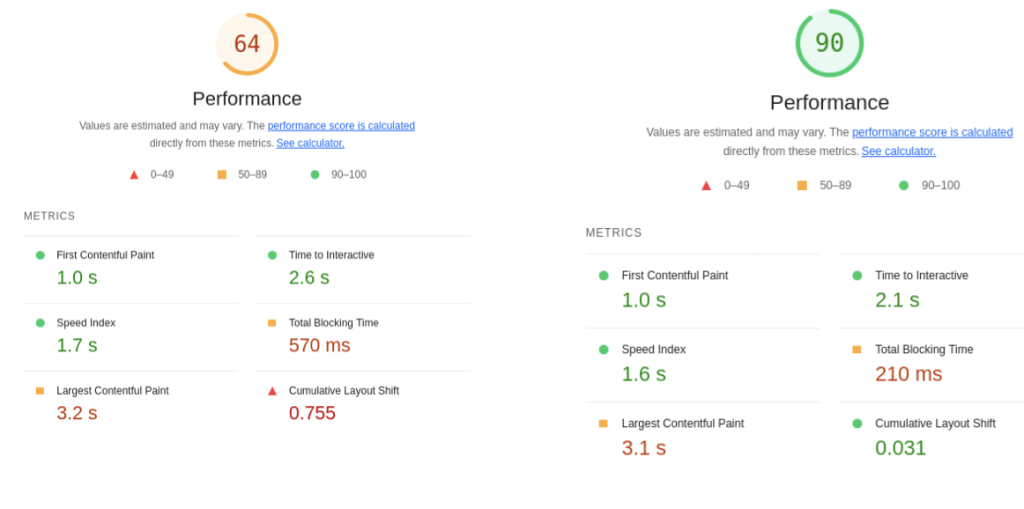
Before & After Virtualization web site performance
Notice FixedSizeList has a defined row item width and height.
But it does not have to.
We can make it dynamic using another helper library.
npm install react-virtualized-auto-sizer @types/react-virtualized-auto-sizerPhotosList.tsx
import React from 'react';
import usePhotos from './usePhotos';
import PhotoCard from './PhotoCard/PhotoCard';
import { FixedSizeList } from 'react-window';
import AutoSizer from 'react-virtualized-auto-sizer';

const PhotosList = () => {
  const { photos } = usePhotos();

  if (!photos) {
    return null;
  }

  return (
    <AutoSizer>
      {({ height, width }) => (
        <FixedSizeList
          height={height}
          width={width}
          itemCount={photos.length}
          itemSize={155}
        >
          {({ index, style }) => {
            const photo = photos[index];
            return <PhotoCard key={photo.id} photo={photo} style={style} />;
          }}
        </FixedSizeList>
      )}
    </AutoSizer>
  );
};

export default PhotosList;
We can use AutoSizer to manage only width or height instead of both. To do that, we need to use the disableHeight or disableWidth attributes.
That’s it.
Now you can render endless lists without worrying about performance.